Transform Event Listings Into Interactive Experiences
Most WordPress event solutions feel heavy, overbuilt, or visually disconnected from the rest of your site. You either install a bloated events plugin with rigid styling or build a basic grid that lacks real calendar functionality.
Event Calendar Studio solves that.
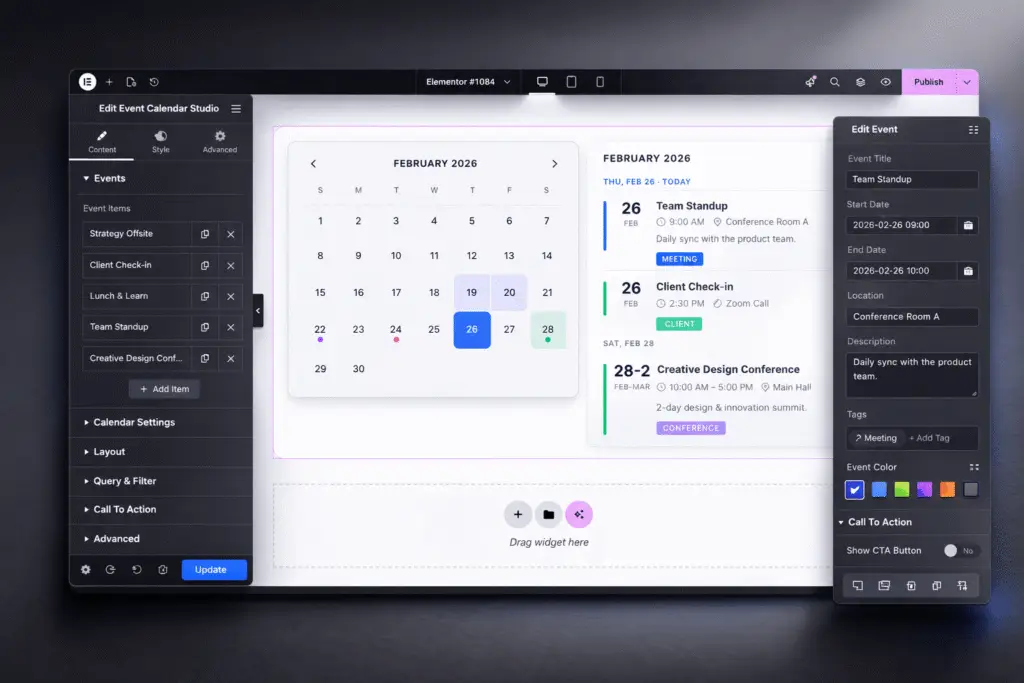
This Signature Series widget combines a true calendar interface with a structured event listing system, all inside Elementor. You are not embedding a third-party system that fights your design. You are building events directly into your visual workflow, with curated style systems and cinematic polish already in place.
Instead of dumping events into a list, you create an interactive scheduling experience. Dates are highlighted. Multi-day events span correctly. Active days are visually emphasized. Users can scan the month, select a date, and instantly view structured event details without friction.
Unlike traditional event plugins that prioritize backend management over frontend design, Event Calendar Studio delivers a visually controlled, design-ready calendar experience built for modern sites.
Event Calendar Studio is built for organizations that rely on scheduled experiences. Schools, churches, agencies, conference hosts, membership communities, and service providers can present upcoming events in a format that is both structured and visually aligned with their brand. It is ideal for event hubs, landing pages, community portals, and ongoing program calendars.
Designed for organizations that rely on schedules to serve their communities. Churches communicating service times and ministry events. Schools sharing academic calendars with parents and students. Community groups coordinating programs. Nonprofits organizing gatherings. Event Calendar Studio gives non-technical teams a structured way to manage and display events while presenting them in a clear, polished format families can easily navigate.
Key Features & Capabilities
- True dynamic calendar generation with accurate months and years
- Dual-layout system with calendar view and synchronized event listing
- Color-coded events for quick visual scanning
- Multi-day event support with proper date spanning
- Active date highlighting including current day emphasis
- Structured event fields for date, time, location, description, and tags
- Icon-supported metadata for enhanced clarity
- Fully responsive layout optimized for desktop and mobile
Why Add Event Calendar Studio to Your Stack
Events are operational touchpoints. If they are disorganized or visually disconnected, user confidence drops.
Event Calendar Studio gives you structured scheduling with cinematic presentation built directly inside Elementor. You keep control of the design, the layout, and the user experience without installing a bulky event management ecosystem.
This is not just a calendar. It is a structured event experience system, engineered for creators who care about both organization and presentation.
Signature Series
Event Calendar Studio
Resource Type
Custom Elementor Widget
Required Plugins
Elementor (Free) or Elementor Pro (optional, not required)
Control Types Included
Calendar Display Management
Generate accurate calendar views automatically. Highlight the current day, display color-coded event markers, and control how event indicators appear inside the calendar grid.
Event Listing Synchronization
Link the calendar to a structured event list so selecting a date dynamically updates visible events. Maintain clear organization between the calendar interface and event details.
Per-Event Content Control
Create individual events with flexible start and end dates, time settings, location fields, descriptions, optional tags, and visual accent colors.
Visual Styling Presets
Leverage Signature Series style systems including Minimal, Bold, Dark Mode, and Pastel. Launch with structure already defined instead of building a calendar UI from scratch.
Interaction & Navigation Control
Enable intuitive month switching, clickable date selection, and responsive behavior across devices for natural browsing.
Check Out More Widgets
Flow Tabs
Dynamic Pricing Table